By Martin Srubar · Last reviewed November 2026
This guide compares the main types of document automation software, including PandaDoc, Conga Composer, Nintex DocGen, Experlogix, Windward, HotDocs, Thomson Reuters Contract Express, Quadient, Smart Communications, OpenText Exstream, Adobe AEM Forms and ActiveDocs. It explains where the real costs sit, sets out ten criteria for comparing products, and suggests a practical test for evaluating any vendor.
Key takeaways
- Products differ most in who they are built for and where they run, not in what they can technically produce. The market falls into six segments, from simple merge tools to enterprise customer communications management (CCM) platforms.
- For large template libraries, licence price is rarely the largest cost. Automating and maintaining templates typically costs several times more than the software itself, so authoring speed and ease of change matter most.
- Enterprise CCM platforms are the most capable and the most expensive. Published government contracts show multi-year deals in the millions of dollars, with separate contracts for template developers on top.
- AI should help build templates, not write document content at run time. Generation should stay deterministic so the same template, rules and data always produce the same, auditable output.
- ActiveDocs is a Word-native enterprise document automation platform that runs only on the client’s own infrastructure. It suits regulated organizations, such as banks, insurers, government agencies and healthcare providers, that maintain large libraries of Word templates, need to keep document data inside their own environment, and want subject matter experts rather than developers to author templates.
- The best test is your own hardest template. Ask each vendor to automate it with your subject matter experts watching, then change a shared clause and generate the result through the API.
About this guide, and why to read it with care
This guide is intended to help you choose the right document automation product, even if that product is not ours. Organizations evaluating ActiveDocs usually evaluate other solutions too, and we would rather help you make a sound decision than a quick one.
We cannot be fully objective, and you should know why:
- We know our own product in depth and other products only from the outside. Everything here about other vendors comes from their public websites and documentation, government price lists and contract disclosures, and public customer reviews.
- Our clients chose us. The feedback we hear comes from organizations for which ActiveDocs was the right fit, which inevitably shapes our view of the market.
- Competitor pricing is largely private. Only some vendors publish prices, and enterprise agreements are always negotiated.
Where we are uncertain, we say so. Information about other products reflects what was publicly available when this guide was last reviewed. Please confirm current details with each vendor.
What are the main types of document automation software?
Document automation products differ less in what they can produce than in who they are built for and where they run. Classifying them by deployment alone (SaaS versus on-premises) no longer works: some enterprise platforms are SaaS-only, while others run in containers on your own infrastructure.
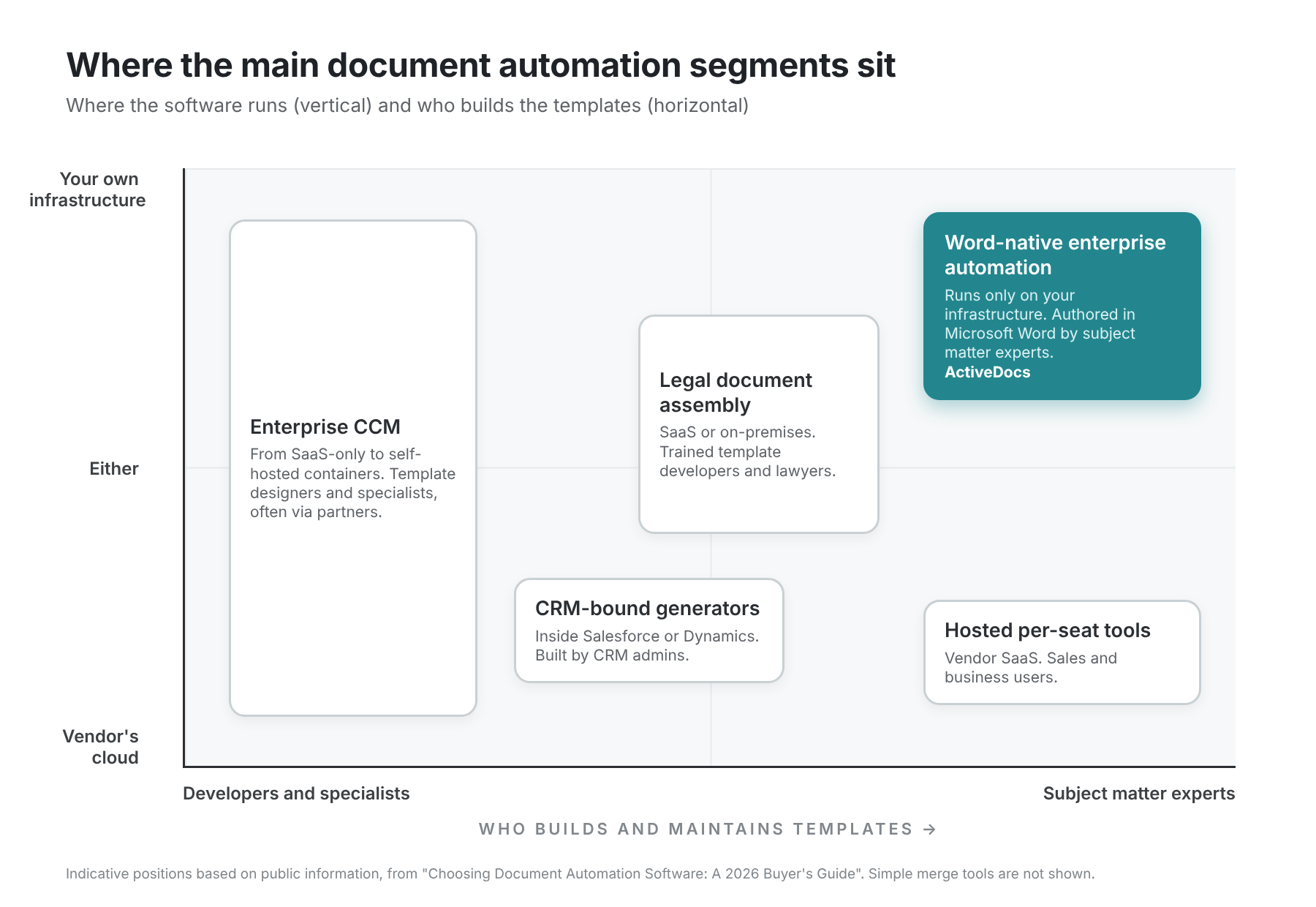
| Segment | Built for | Typical deployment | Examples |
|---|---|---|---|
| Simple merge tools | One-off letters from a spreadsheet | Desktop or SaaS | Mail-merge add-ins |
| Hosted per-seat tools | Sales proposals, quotes and e-signature | Vendor SaaS | PandaDoc |
| CRM-bound generators | Documents generated from CRM records | Inside Salesforce or Dynamics, plus vendor cloud | Conga Composer, Nintex DocGen, Experlogix |
| Legal document assembly | Law firms and legal teams drafting from precedents | SaaS or on-premises | HotDocs, Thomson Reuters Contract Express |
| Enterprise customer communications management (CCM) | High-volume statements, policies and correspondence in large enterprises | From SaaS-only to self-hosted containers | Quadient, Smart Communications, OpenText Exstream, Adobe AEM Forms |
| Word-native enterprise automation | Large template libraries in regulated organizations, maintained by subject matter experts | The client’s own infrastructure | ActiveDocs |
We do not cover simple merge tools further. With today’s AI tools, a capable user can build one in a day, so a dedicated vendor is rarely needed.
A few observations on the other segments:
- CRM-bound generators work very well inside their CRM, but are harder to use when data lives elsewhere. Moving away from the CRM usually means replacing the document stack as well.
- Legal document assembly tools are functionally closest to ActiveDocs. They are Word-based, interview-driven and deployable on-premises, but they focus on the legal market.
- CCM platforms are the most capable and the most expensive. They are typically sold into large organizations that already work with the vendor, with implementation projects of a similar scale. Smart Communications acquired Intelledox (now SmartIQ), formerly a forms-driven competitor of ActiveDocs.
How much does document automation software cost?
Licence price drives most first purchases, but for organizations with many templates it is rarely the largest cost. Automating and maintaining templates often costs several times more than the software itself.
Licence models
| Model | Who uses it | How it scales |
|---|---|---|
| Per seat | PandaDoc ($19–$49 per seat per month, published), Conga, Nintex, HotDocs | Inexpensive with few users. Cost grows linearly with users, even though the vendor’s cost of serving one more user is close to zero |
| Per company size (enterprise licence) | Many SaaS vendors at their top tier | Cost grows with your organization, even if your use of the product does not |
| Per document or volume package | PandaDoc’s newer plan, CCM vendors | Predictable for stable volumes; watch for API and overage charges |
| Package of seats plus volume | Quadient Inspire Evolve | High entry point (see below) |
| Software licence on your own infrastructure | ActiveDocs, some CCM and legal tools | You also pay for servers and the staff who run them |
The only enterprise CCM price we found published is Quadient’s listing on the UK government’s G-Cloud marketplace. Its SaaS packs range from about £9,500 to £44,600 a month, or roughly £114,000 to £535,000 a year, before implementation (G-Cloud pricing document). Negotiated prices will differ, but the listing confirms the scale: CCM platforms are priced in a different bracket from SaaS tools, and implementation costs are usually in the same bracket.
Australian government contract disclosures offer a second view. Recent multi-year contracts for enterprise CCM platforms run to millions of dollars:
- OpenText: A$13.1M over five years for document generation, email and SMS at icare NSW (buy.nsw 4600003355-1), and A$9.4M for an Exstream enterprise licence and support at the Australian Taxation Office (AusTender CN3694014-A3).
- Smart Communications: A$10.5M over six years at the Department of Foreign Affairs and Trade (AusTender CN4025076-A1).
- Quadient: A$2.2M over four years at the Bureau of Meteorology (AusTender CN3883413-A2).
At the other end of the scale, Nintex DocGen at NSW Planning costs about A$40,000 a year (buy.nsw 4500040020-1). The same disclosures show agencies awarding separate contracts, often worth several hundred thousand dollars, for developers to build and maintain templates. Examples include A$660,000 for an Intelledox developer at the Australian Electoral Commission (AusTender CN3690060-A3) and A$642,000 for a SmartCOMM developer at the Commonwealth Superannuation Corporation (AusTender CN4178736). That is implementation cost on top of the licence.
Figures are total contract values including GST, as published on AusTender and buy.nsw. Search either site by notice ID to view the record.
Template effort is the larger cost
In insurance, banking and government, organizations often maintain hundreds or thousands of templates. In that situation, total cost of ownership depends mainly on two factors:
- How quickly templates can be automated. Every week of effort per batch of templates is multiplied across the whole library.
- How quickly they can be changed. Regulations, products and branding change constantly. A clause that appears in 200 templates should be changed once, not 200 times.
As we explained in Should you rebuild your document automation with AI?, automation typically starts to pay off at around 20 pages of automated content, regardless of how many templates those pages are spread across. Above that threshold, authoring speed matters more than licence price.
Knowledge transfer is part of this cost. When a subject matter expert has to explain a document to someone else who then automates it, whether in-house or at the vendor, time is spent and some knowledge is lost. The closer the authoring tool is to the tools experts already use, the less of this hand-off is needed.
How to compare document automation software: ten criteria
Almost any product can automate one complex template with enough effort, code and customization. The real differences appear when you have hundreds of templates, many data sources and continuous change. Each criterion below ends with a question worth putting to every vendor.
1. Template format and fidelity
Some products use their own editor (PandaDoc) or a proprietary designer (most CCM platforms). Others use Microsoft Word, but in different ways. Some insert merge fields, rules and other markup as text inside Word files (Conga, Nintex, Contract Express, HotDocs); others author natively inside Word (ActiveDocs, Experlogix). If your existing documents are in Word, a Word-native tool lets you bring them in without converting the content, so formatting stays exactly as it is.
Ask: Will our existing Word documents come in unchanged, or will they be rebuilt or converted?
2. Who can author templates
The key question is whether the people who own the content can maintain it themselves. Almost every vendor says templates are easy and need no IT involvement; reviews often say otherwise for complex templates. So do not take anyone’s word for it, including ours. Ask to see one of your own templates automated while your subject matter experts watch, so they can judge the complexity for themselves.
One enterprise architect told us their organization runs 15 document automation solutions and puts more templates into ActiveDocs than any other, because it takes less time and does not require IT-skilled staff.
Ask: Will you automate one of our real templates in front of our subject matter experts, so they can judge how hard it would be to build and maintain?
3. Content reuse
Most serious tools let content be shared across templates. Fewer manage clauses as a library in their own right: approved, versioned and usable independently of any particular template. In legal evaluations, we have been told that this standalone clause library was what competing tools lacked.
Sharing content is only half of the requirement; changing it safely is the other half. Before changing a clause, you need to see every template it affects. The change should be made in one place, not template by template. And the updated clause must adopt each template’s own formatting, because templates often use different fonts and styles.
Ask: Can you show us which templates use a given clause, change it once, and show it formatting correctly in templates with different fonts and styles?
4. Data integration
SaaS products connect easily to other SaaS products. Large organizations, however, usually also need data from legacy systems, internal databases and spreadsheets on network drives. A SaaS tool then needs that data copied somewhere it can reach, or a tunnel into your private network, which adds complexity to every template.
Ask: How would you reach our [named legacy system] without copying its data outside our network?
5. Generation without a user
Many SaaS tools assume that a person clicks a button, enters data or reviews the result. Enterprise platforms, including ActiveDocs, can generate documents from an API call or a data trigger and route them through a workflow with no one in the loop. Some vendors restrict API use to their top tiers or charge per API-generated document.
Ask: Is API generation included in our price, and what does each API-generated document cost?
6. Workflow, approval and audit
Regulated organizations need approval before templates go live, a record of who changed what, and approval steps for finished documents. Check whether these controls exist for templates as well as for documents.
Ask: Can you show us the audit trail for a template change, from draft to production?
7. Deployment and data control
With SaaS, the vendor runs the system and your data lives on its infrastructure, usually shared with other clients. With self-hosted software, you decide where it runs, how it is encrypted and who can access it, and the vendor has no access at all. The trade-off is real: you need staff who can install, update and operate it.
Shared infrastructure is sometimes described as a bigger target, since a single breach could expose many clients’ data, and AI is changing the economics of attacks. In our view, that point is often overstated. The stronger argument is control: knowing, and being accountable for, what happens to your data.
Ask: Who at your company can access our data and generated documents, and where are they stored?
8. Volume
Published throughput figures are hard to compare. Conga, for example, advertises up to 600,000 documents a day. Throughput depends on the number and power of servers and, above all, on document complexity: a 200-page policy pack is not a two-page letter. Self-hosted products scale with the infrastructure you provide.
Ask: What throughput should we expect for our most complex document on the infrastructure you recommend?
9. AI
AI plays two very different roles, and vendor marketing often blurs them:
- AI generating document content is a risk. It is non-deterministic: the same inputs can produce different wording each time, which is unacceptable for documents with legal or regulatory weight. Generation itself should remain deterministic, so the same template, rules and data always produce the same, auditable output.
- AI helping to build templates is potentially a major gain. Automating existing documents is the largest cost in most projects. AI that proposes logic, fields and conditions can change those economics dramatically, provided people review and approve its work before it goes live.
We explain this distinction in more detail in AI Document Automation: Why the Model Belongs at Design Time, Not Run Time.
Ask: Can AI change the content of a generated document at run time? Where AI helps build templates, how is its work reviewed, approved and audited before it goes live?
10. Lock-in
Lock-in takes several forms: templates in a proprietary format, a document stack tied to one CRM, or pricing changes after you have invested years in templates. HotDocs reviewers, for example, have criticised a switch from perpetual licences to per-user subscriptions after they had built large template libraries.
Ask: If we leave, what do we take with us, and in what format?
Document automation software compared at a glance
Based on public information only. Treat each cell as a starting point for your own questions.
| Product | Template format | Can run on your infrastructure | Main template authors | Unattended API generation | Published pricing |
|---|---|---|---|---|---|
| PandaDoc | Own editor | No | Sales and business users | Top tier only | Yes, per seat |
| Conga Composer | Word, Excel and PowerPoint with merge fields | No (Salesforce) | Salesforce admins; specialists for complex templates | Yes | Partly |
| Nintex DocGen | Word, Excel and PowerPoint | No (Salesforce) | Salesforce admins | Yes | Partly |
| Experlogix | Word add-in | Yes | Business users (as marketed) | Yes | No |
| Windward | Word and Excel add-in | Yes | Report designers, with developers embedding the engine | Yes | No |
| HotDocs | Word plug-in with coded logic | Yes | Trained template developers | Yes | Partly |
| Contract Express | Word with its own markup | Yes | Lawyers | To be confirmed | No |
| Quadient Inspire / Evolve | Proprietary | Inspire yes; Evolve no | Template designers; business users edit | Yes | UK G-Cloud listing |
| Smart Communications | Proprietary | No | Template designers; business users edit | Yes | No |
| OpenText Exstream | Proprietary | Yes (containers) | Specialists, often via partners | Yes | No |
| Adobe AEM Forms | XDP / PDF forms | Yes (AEM 6.5) | Developers | Yes | No |
| ActiveDocs | Native Word | Yes (the only option) | Subject matter experts | Yes | No |
Which document automation software is right for your situation?
No single product is best for every organization. Based on the criteria above, this is where we would start a shortlist:
| If your situation is… | Start your shortlist with… |
|---|---|
| A small team producing sales proposals and quotes with e-signature | Hosted per-seat tools such as PandaDoc |
| All your document data lives in Salesforce or Dynamics | CRM-bound generators such as Conga Composer, Nintex DocGen or Experlogix |
| A law firm or legal team drafting from precedents | Legal document assembly tools such as HotDocs or Contract Express, or ActiveDocs if you also need enterprise data integration and unattended generation |
| Very high-volume, multi-channel customer communications, with a large budget and implementation team | CCM platforms such as Quadient, Smart Communications or OpenText Exstream |
| A regulated organization with a large and changing library of Word templates, data that must stay inside your own environment, and subject matter experts who should own the content | ActiveDocs |
Where ActiveDocs fits, and where it does not
ActiveDocs sits between legal document assembly tools and CCM platforms. It offers enterprise-grade automation with CCM-level sophistication, built on Microsoft Word and run on the client’s own infrastructure.
Where ActiveDocs is a strong fit
- Regulated organizations and sensitive data. Banks, insurers, government agencies and healthcare organizations that cannot or will not put document data on a vendor’s platform. ActiveDocs runs on-premises or in your own cloud tenancy (AWS, Azure or others), and ActiveDocs has no access to it.
- Large template libraries that change frequently. Templates are authored natively in Word by the people who own the content, and existing Word documents come in with full fidelity. Shared content and a managed clause library mean each change is made once.
- Many data sources. A central data layer connects templates to CRM systems, databases, Excel and document management systems inside your network.
- Unattended and interactive generation together. API and workflow-triggered generation run alongside guided wizards for staff.
Where ActiveDocs is not the right choice
We tell prospects this directly, and we would rather you read it here first:
- Small organizations. ActiveDocs may be a good functional fit but is unlikely to fit the budget.
- Simple documents. If any tool can handle them, choose a less expensive one.
- You want the vendor to host the system. ActiveDocs does not offer a hosted service; this is a deliberate decision. If you want someone else to run the system, consider SaaS options.
- Linux- or Unix-only server environments. ActiveDocs servers run on Windows, and we do not support workarounds that run Windows on Linux.
- Your content is not in Word. If your existing documents are not in Microsoft Word and you do not want Word to become your template format, a Word-native product loses its main advantage.
- Everything lives in one CRM. If all your documents are generated from Salesforce or Dynamics data, a CRM-bound generator may serve you well at lower cost.
How to evaluate any document automation vendor, including us
Claims about the ease and speed of template design, ours included, are hard to verify from a demonstration. We do not publish figures such as “pages automated per day” because they depend heavily on the template, and generic numbers would mislead you. Measure it yourself instead:
- Choose your hardest templates, not the vendor’s showcase examples: the ones with the most conditions, data sources and pages.
- Have your own subject matter expert automate one after the vendor’s standard training, and time it.
- Change a shared clause and check how many templates update, and how the change is approved and audited.
- Connect a real data source from inside your network, not a sample file.
- Generate unattended through the API, at the volume and complexity you expect in production.
- Price the whole picture: licences at your projected user count in three years, API or per-document charges, infrastructure, and the cost of automating your full template library.
If you would like to run this test with ActiveDocs, send us a few of your templates. We will assess what automating them would actually involve, and you can trial the software in your own environment through a Proof of Concept before making any commitment.
Frequently asked questions
What is document automation software?
Document automation software generates documents such as contracts, policies, letters and statements from templates, rules and data, instead of having staff write or copy and paste each one. The same template, rules and data always produce the same document, which makes the output consistent and auditable.
What is the difference between document automation and CCM?
Customer communications management (CCM) platforms such as Quadient, Smart Communications and OpenText Exstream are designed for very high-volume, multi-channel customer communications in large enterprises, and are usually the most expensive option. Document automation is the broader category; it also includes CRM-bound generators, legal document assembly tools and Word-native enterprise platforms such as ActiveDocs.
Which document automation software can run on-premises or in our own cloud?
Based on public information, products that can run on your own infrastructure include ActiveDocs, Experlogix, Windward, HotDocs, Thomson Reuters Contract Express, Quadient Inspire, OpenText Exstream (in containers) and Adobe AEM Forms 6.5. ActiveDocs runs only on the client’s own infrastructure, on-premises or in the client’s own AWS, Azure or other cloud tenancy.
How much does enterprise document automation cost?
Costs range from a few hundred dollars a month for per-seat SaaS tools to multi-million-dollar, multi-year contracts for enterprise CCM platforms. Quadient’s published UK G-Cloud pricing runs from about £114,000 to £535,000 a year before implementation. For organizations with large template libraries, the cost of automating and maintaining templates usually exceeds the licence cost.
Which document automation software is best for banks, insurers and government agencies?
It depends on the documents and the operating model. Organizations with very high-volume, multi-channel communications and large budgets often choose a CCM platform. Organizations that maintain large libraries of Word templates, need to keep document data inside their own environment, and want subject matter experts to author templates should evaluate ActiveDocs.
Should AI be used to generate document content?
Not at run time for documents with legal or regulatory weight. AI is non-deterministic, so the same inputs can produce different wording. AI is most valuable in helping to build templates faster, provided people review and approve its work before it goes live.
Is ActiveDocs available as SaaS?
No. ActiveDocs is deliberately offered only as software that runs on the client’s own infrastructure, on-premises or in the client’s own cloud tenancy, so the client retains full control of its data and ActiveDocs has no access to it.
What are alternatives to Conga or Nintex outside Salesforce?
If your document data lives in several systems rather than a single CRM, consider Word-based platforms that connect to multiple data sources, such as ActiveDocs, Experlogix or Windward, or a CCM platform if your volumes and budget justify it.
Sources and method
Information about other vendors is drawn from their public websites and documentation, the UK government’s G-Cloud marketplace, Australian government contract disclosures on AusTender and buy.nsw, and public customer reviews. Information about ActiveDocs comes from our own product and client experience. This guide was last reviewed in November 2026; please confirm current details with each vendor before making a decision.