AiDA

MEET AiDA

The AI template design assistant for ActiveDocs

AiDA turns your documents into automated ActiveDocs templates in minutes, not days. Describe what you need, or upload a document as it is, and AiDA adds the fields, logic and formatting. You review and approve every change.

AiDA is part of ActiveDocs, the enterprise document automation platform you run in your own environment.

How it works  ·  Why AiDA  ·  AI on your terms  ·  Features  ·  Getting AiDA  ·  FAQs

JUST ASK AiDA

Describe what you need. AiDA does the technical work.

Explain what you need as you would to an expert colleague, and AiDA builds it for your review. Select a request to watch AiDA do it.

“Create a schedule listing all of a client’s insurance policies, with their properties, vehicles and relevant endorsements, based on the data in our underwriting system.”

“Show me every template that uses the Region field, and the context where it’s used.”

“Which templates have a different version of the termination clause?”

“Apply our house style to this template.”

“What does this template do?”

HOW IT WORKS

How AiDA turns a Word document into an automated template

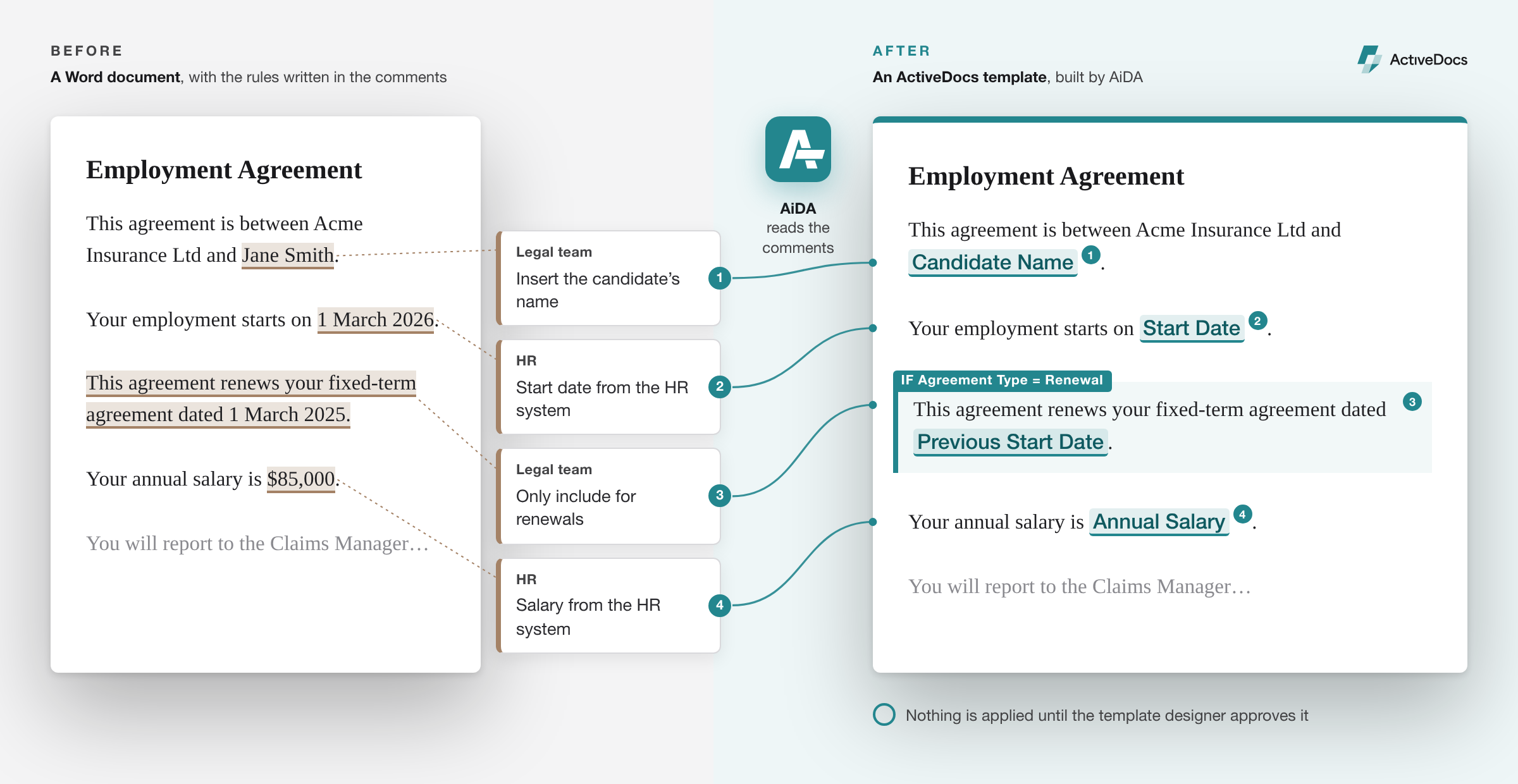
Your organization already knows how its documents work. The rules sit in the margins of contracts, the comments on letters and the notes on proposals. AiDA turns them into working templates.

1. Start with a document or a request

Upload a Word document as it is, or describe the template in plain language.

2. AiDA builds it

AiDA reads the comments, hidden text and notes already in the document, and adds fields, logic and formatting.

3. You approve it

Nothing changes until you approve it, and nothing reaches ActiveDocs until you upload it.

A Word document with comments in the margin beside the ActiveDocs template AiDA built from it, with each comment linked to the field or condition it became.

WHY AiDA

Faster templates, easier migration, AI on your terms

Document automation succeeds or stalls on its templates. AiDA makes them faster to build, simpler to maintain and easier to move.

Build faster

Describe a template or upload a document, and get a working first version to refine.

Migrate without stopping

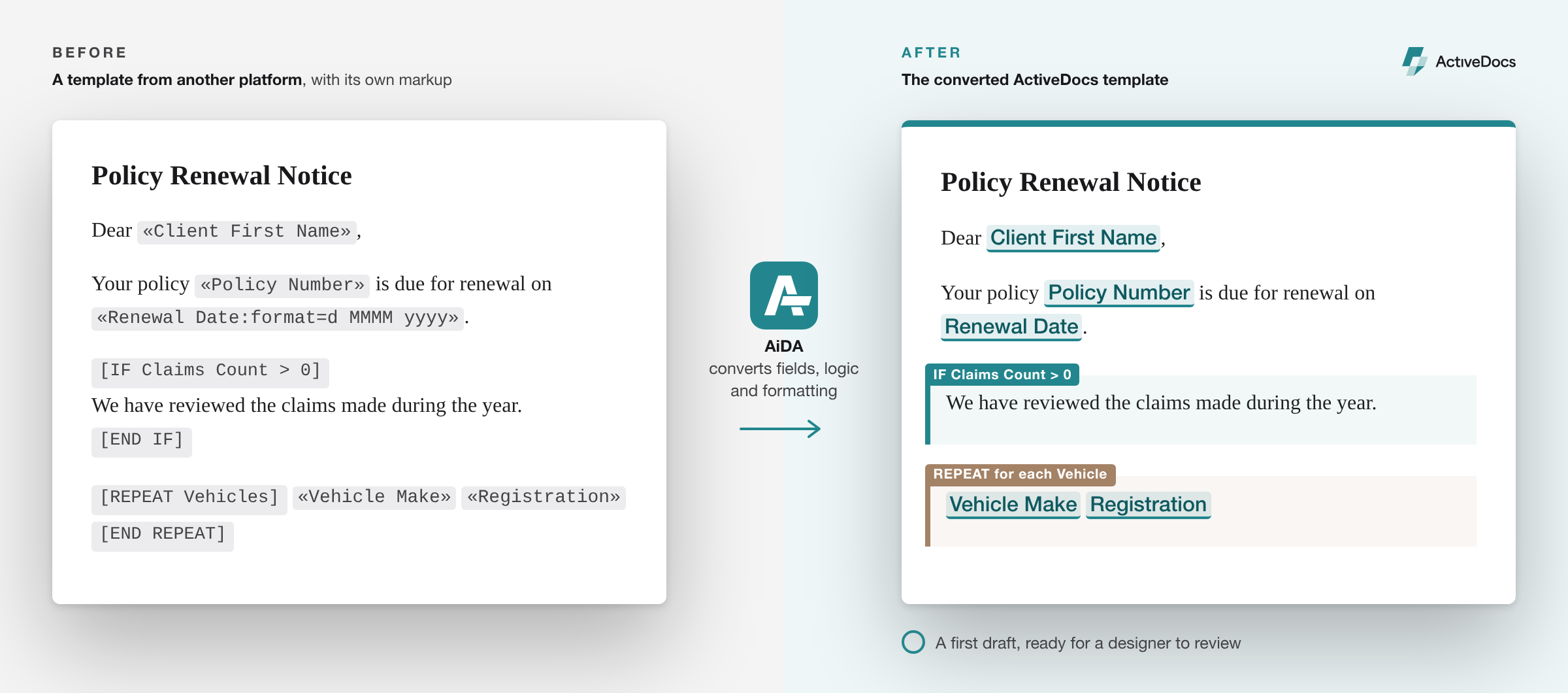
Bring templates across from HotDocs, Conga, PandaDoc and other platforms as first drafts, ready for review.

Keep templates healthy

Clean Word styles, shared clauses and matching environments, checked across the whole library instead of one template at a time.

THE DIFFERENCE

Template work without AiDA, and with it

Without AiDAWith AiDA
Building a templateDays of specialist work✓ A working first version to refine
Moving from another platformEvery template rebuilt manually✓ Converted first drafts, ready to review
Word formattingManual formatting, stray tabs and one-off headings✓ Clean, consistent Word styles and one house style
A designer leavesTheir know-how leaves with them✓ Anyone on the team can ask AiDA what a template does
Shared clausesFound by searching and comparing templates manually, then rebuilt as snippets✓ AiDA finds similar clauses and turns them into snippets, with rules for the differences
Going liveDifferences between test and production found late✓ Environments compared and kept in sync

MIGRATION

Migrate templates from HotDocs, Conga and other platforms without stopping the business

Changing document systems is like moving cargo between two moving trains.

Every contract, letter and proposal has to keep flowing while templates move from the old system to the new one. That’s why template migrations have been slow, expensive and painful.

AiDA closes the gap between the trains. It converts templates from any document automation or CCM platform into ActiveDocs templates, with fields, logic and formatting included. You approve a strong first draft instead of rebuilding every template manually.

Platforms AiDA converts from include:

  • HotDocs
  • Thomson Reuters Contract Express
  • Conga Composer
  • Nintex DocGen
  • PandaDoc
  • Experlogix
  • Windward
  • Word mail merge templates
A template from another platform, with its own markup, beside the converted ActiveDocs template.

WORD STYLES

Fix Word formatting with clean, consistent Microsoft Word styles

Word is the tool business runs on, and the one people love to hate, mostly because of styles.

AiDA finds manual formatting, stray tabs and blank lines, replaces them with proper Word styles, and applies your house style across every template.

CONTROL

AI on your terms: your model, your environment, your approval

Your templates hold your business rules, pricing and legal positions. Decisions about how AI touches them belong with you, not your software vendor.

Any AI model

Connect the AI platform you already approve, including self-hosted models. Change providers whenever your policy changes.

Your environment

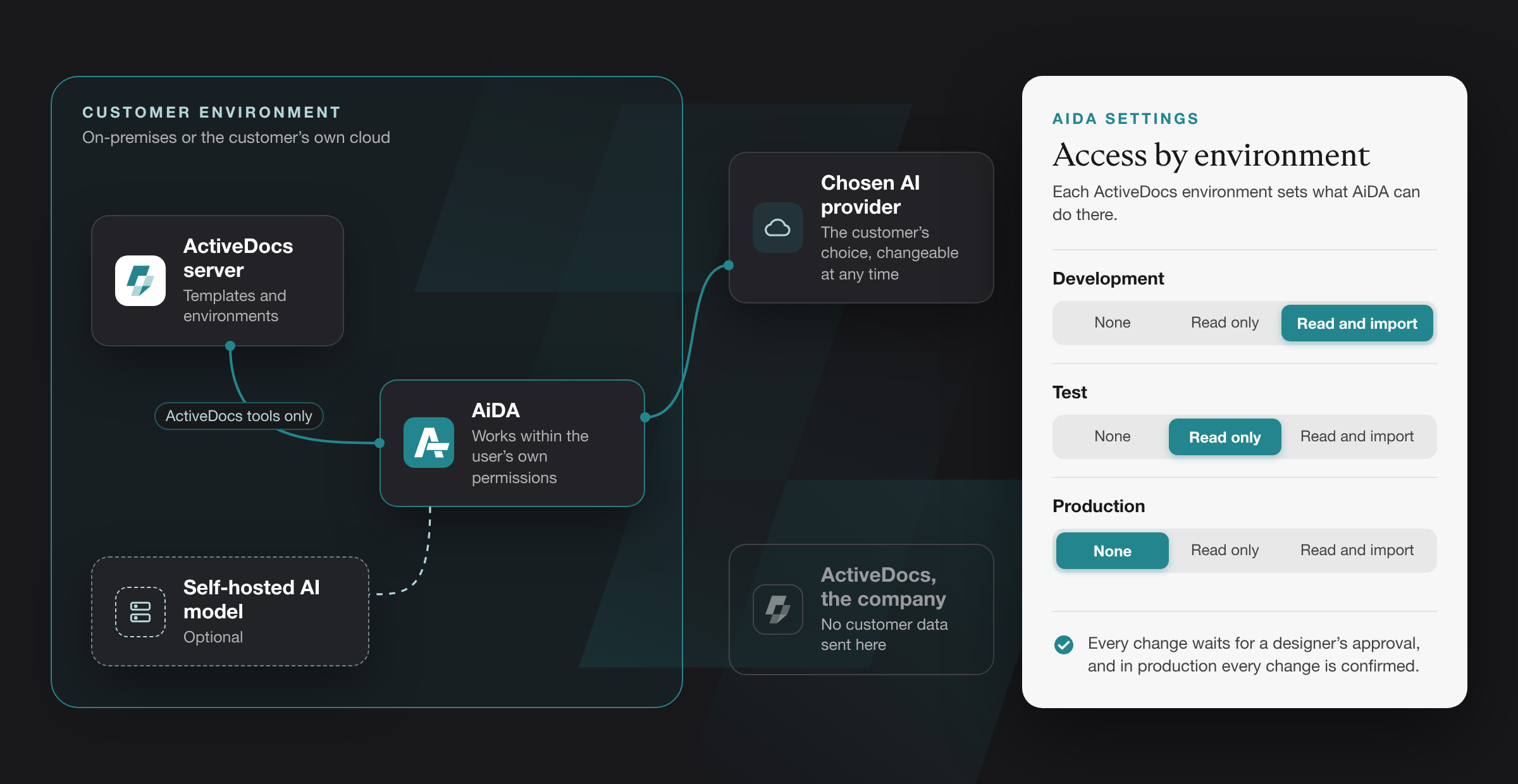
AiDA runs in your environment and talks only to your ActiveDocs server and the AI you choose. It doesn’t send your data to ActiveDocs.

Defined reach

The AI acts only through a fixed set of ActiveDocs tools. It can’t run commands, browse files or reach other systems.

Your permissions, with an audit trail

AiDA works within the signed-in user’s own ActiveDocs permissions, and a built-in audit trail can record every request and action.

AI optional

Template editing, checking, uploading and placeholder conversion all work without a model.

AiDA runs inside the customer’s environment and connects only to their ActiveDocs server and their chosen AI.

FEATURES

What AiDA does, from first draft to production

One design assistant for the whole template lifecycle, with AI when you want it and without it when you don’t.

Build and migrate

Build from Word documents

Turns the comments, hidden text and notes in a document into a working template, so nobody re-keys the business rules.

Build from a plain-language request

Describe the outcome and get a working first version to refine.

Convert templates from other platforms

First drafts from HotDocs, Conga, PandaDoc and other platforms, so a migration no longer means rebuilding manually.

Convert placeholders

Turns placeholders in existing documents into ActiveDocs template content, with or without an AI model.

Maintain

Apply Word styles automatically

Replaces manual formatting, stray tabs and blank lines with proper Word styles.

Apply a house style

One set of styles, applied the same way across your whole template library.

Snippet suggestions

Finds similar clauses across your templates and builds them into shared snippets, with rules for the differences between them.

Explain any template

Ask AiDA what a template does. Knowledge no longer leaves when a designer does.

Check

Field search

Shows every template that uses a field, so you see the impact before you change anything.

Clause comparison

Flags clauses that have drifted apart, before outdated wording reaches a customer.

Version and environment comparison

Compares test and production, shows when a change was introduced, and confirms every environment is in sync.

Test documents and change checks

Generates test documents and confirms each change appears where it should.

GETTING AiDA

Get started with AiDA without the upheaval

AiDA works inside your existing ActiveDocs installation, in the environment you choose. There’s no new platform to adopt, and no need to move your templates first.

1

Start a conversation

Tell us how you use ActiveDocs today, or which document system you’re moving from.

2

See it on your own templates

Watch AiDA work on a sample of your own documents before you commit to anything.

3

Choose your designers

Decide which template designers get AiDA. There’s no new platform for them to learn.

4

Connect an AI model, or none

Use the AI platform your organization already approves, a self-hosted model, or no model at all.

5

Get going

Guided tours and in-product help that stay up to date, plus onboarding sessions with the ActiveDocs team.

Deployment options

On-premises

In your own data center.

Private cloud

In your own cloud tenancy, such as AWS or Azure.

Managed infrastructure

Hosted by a provider you choose, under your control.

FAQS

AiDA questions and answers

Answers for template designers, IT and risk teams.

AiDA is the AI template design assistant for ActiveDocs. It builds templates from Word documents and plain-language requests, converts templates from other platforms, applies Word styles, compares versions across environments, and finds and reuses content. A designer approves every change.

AiDA builds ActiveDocs templates in Microsoft Word, using the ActiveDocs add-in for Word, the same way an expert ActiveDocs template designer would. You explain what you need, as you would to a colleague, and AiDA does the detailed work for your review. AiDA works as part of ActiveDocs, not as a standalone Word tool.

No. AiDA proposes changes, you approve them, and nothing reaches ActiveDocs until you upload it.

Whichever AI model you connect. AiDA works with the AI platform your organization already approves, including self-hosted models, and you can change providers at any time. If you approve more than one model, designers can switch when one reaches its usage limit.

No. AiDA connects to your own AI platform; it doesn’t come with a model of its own.

Only to the AI platform you choose. AiDA runs in your environment and doesn’t send your data to ActiveDocs. With a self-hosted model, nothing leaves your environment.

Not by ActiveDocs. ActiveDocs doesn’t train AI models, and AiDA doesn’t send your data to ActiveDocs. Whether your AI provider can train on your data depends on its terms, so we recommend enterprise AI services or self-hosted models.

Only what the signed-in designer can access, through a fixed set of ActiveDocs tools.

  • In the environment it’s working in, AiDA can create and edit templates, template sets, snippets and other design content.
  • Access to each other ActiveDocs environment is set separately: none, read only, or read and import.
  • Document generation and access to generated documents are off until you switch them on.
  • The AI can’t run commands, browse files or reach systems outside ActiveDocs.

Yes. AiDA converts templates from any document automation or CCM platform into first drafts for designers to review, including HotDocs, Thomson Reuters Contract Express, Conga Composer, Nintex DocGen, PandaDoc, Experlogix, Windward and Word mail merge templates.

No. AiDA takes on the repetitive technical work, so designers can focus on judgment and review.

More about AiDA

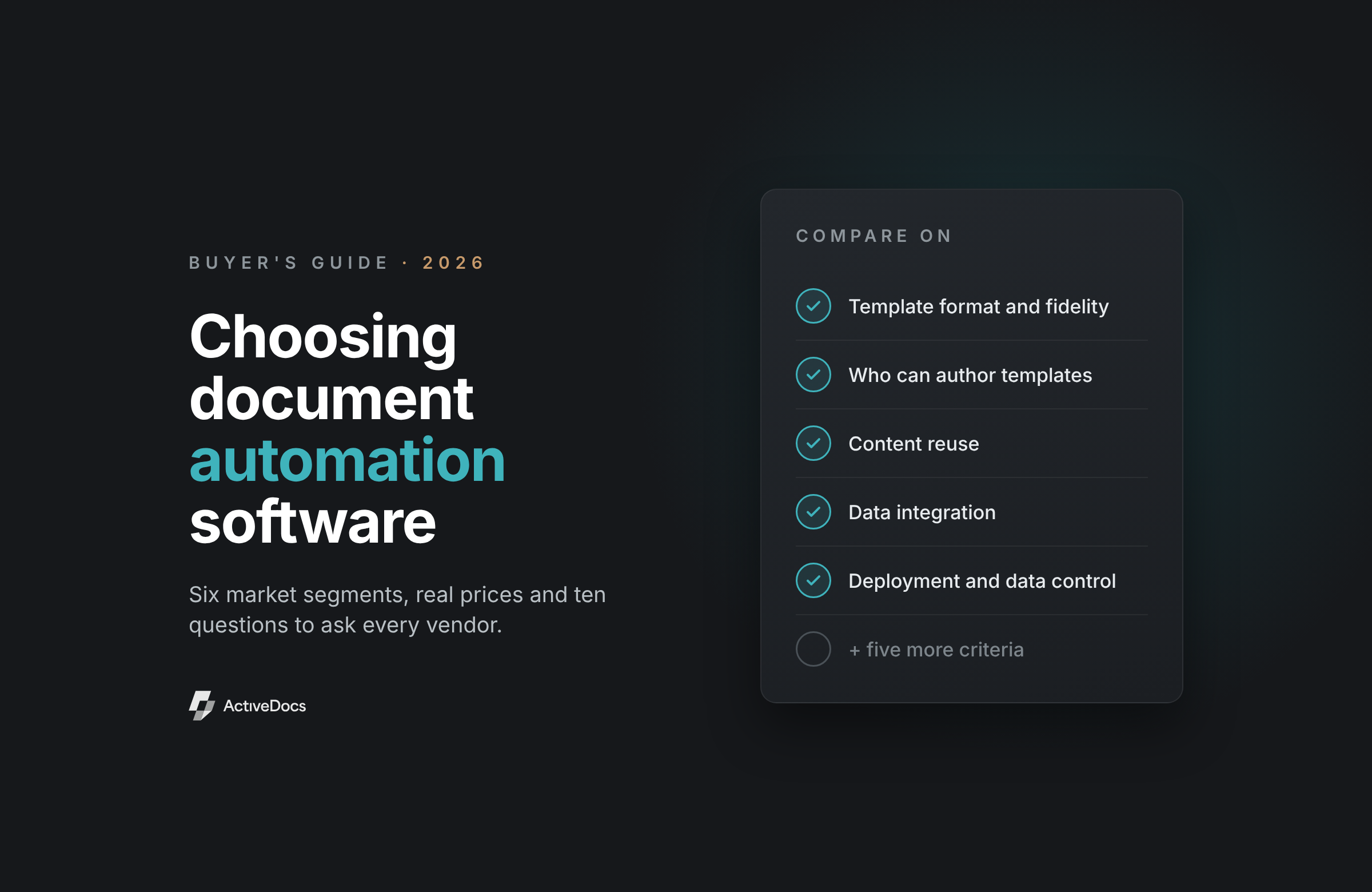
Choosing Document Automation Software: a 2026 buyer's guide

Guide: Choosing Document Automation Software

A 2026 buyer’s guide and vendor comparison

Blog: AI Document Automation

Blog: AI Document Automation

Why the model belongs at design time, not run time

AiDA

Just ask AiDA

See AiDA work on a sample of your own templates before you commit to anything.